Design accessibility into every Figma file
Assign structure and components on the canvas, then run WCAG 2.2 checks — before engineering builds the wrong thing.
Download AccessUX DesignLint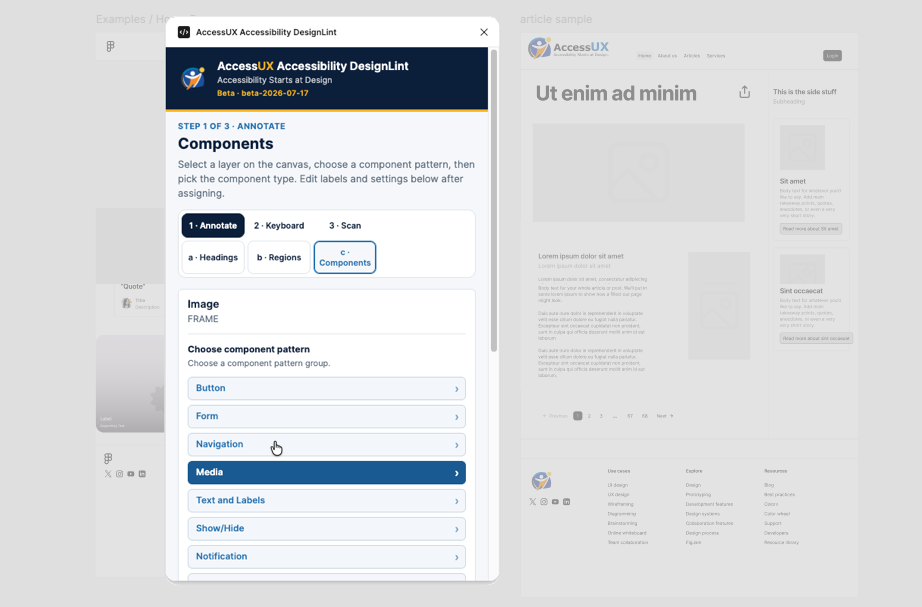
Private beta. Figma Desktop required. Install takes about two minutes.
What it does
AccessUX Accessibility DesignLint helps designers mark headings, landmarks, and interactive components in Figma, keep annotations on the canvas, and scan the page for WCAG 2.2 issues — so accessibility work starts in design, not only in QA.
- Structure — headings (H1–H6), regions, lists
- Components — buttons, links, forms, media, patterns like accordion and pagination
- Scan — WCAG 2.2 checks on selection or the page
Download
Current build: beta-2026-07-17
Released: 17 July 2026
Requires: Figma Desktop for macOS or
Windows (not the browser)
After download: unzip → import manifest.json in Figma (steps
below). Confirm the build label in the plugin header matches this page
(Beta · beta-2026-07-17).
Install
Beta (Development plugin)
-
Download and unzip to a permanent folder (for example
~/Plugins/accessux-designlint/). - Open Figma Desktop.
- Go to Plugins → Development → Import plugin from manifest…
-
Select
manifest.jsonfrom the unzipped folder. - Run Plugins → Development → AccessUX Accessibility DesignLint.
Updating: Replace the files in the same folder with a new zip, then Reload the plugin. Check that the header shows the new build label (for example Beta · beta-2026-07-17).
Figma Community
One-click install from the Figma Community will be available when DesignLint is published. Until then, use the Development plugin install above.
What’s new
beta-2026-07-17
- Component State from Figma variants syncs into DesignLint assignments
- Improved badge docking so annotations stay clear of design content
- Clearer accordion nested requirements and component picker
- Quieter region warnings and updated AccessUX branding in the panel
Feedback
This is a beta. Include the build label from the plugin header in every report.
Contact: support@accessux.com.au · Contact form
Frequently asked questions
Does this work in the Figma browser?
Beta installs are Development plugins and need Figma Desktop. After Community publish, you can run the plugin from the browser where Figma allows Community plugins.
Is this free?
Free during private beta.
Where do annotations live?
On a dedicated AccessUX lint layer in the file so they stay with the design for handoff.