Published:
'Shift-left accessibility' has become a buzzword, but the teams who do it well treat it as a cultural shift, not a checklist. And the payoff is enormous: faster releases, fewer bugs, and dramatically lower remediation costs.
Shift Left Isn’t a Slogan — It’s a Delivery Strategy
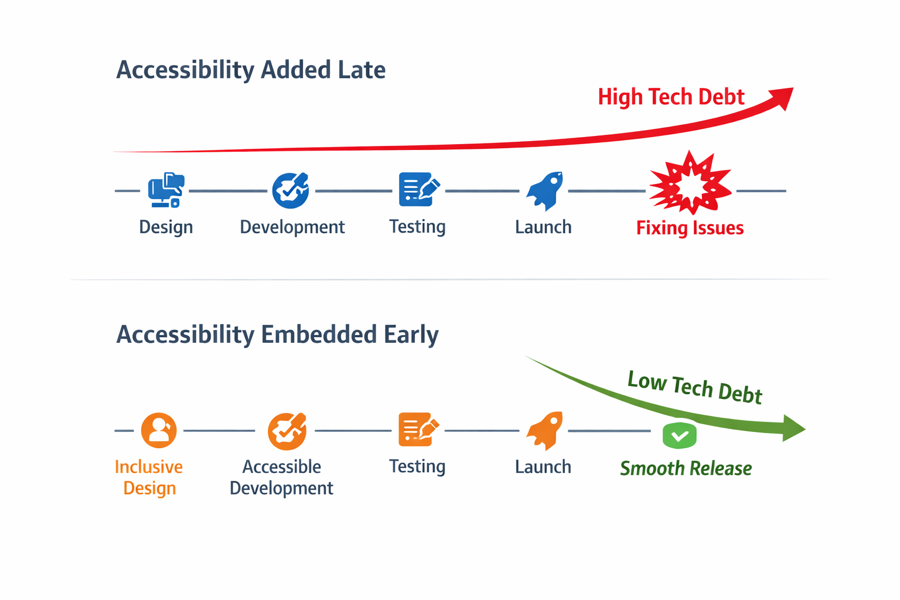
High-performing teams have been shifting left for years, but the term only recently entered the accessibility lexicon. Rather than considering accessibility as an afterthought, teams who do it well embed accessibility into every stage of delivery — from discovery to deployment.
What Shift Left Actually Means
Shift-left accessibility means moving accessibility work earlier in the lifecycle:
- Discovery
- UX
- Design
- Development
- QA
- Release
It’s about preventing issues, not detecting them.
Discovery & UX: Where Accessibility Begins
1. Accessible personas and journeys
Include users with disabilities in personas and scenarios. That ensures accessibility is part of the problem definition, not an afterthought. You might be able to easily expand that menu by clicking a button; but what if you use a keyboard to navigate the screen and not a mouse? Or if you don’t see the button at all and rely on screen reader cues? Inclusive design starts with considering the many ways people might see and use your user interface.
2. Early semantic decisions
Structure comes before styling. A developer I met the other week said he always favours semantic HTML markup with its inbuilt accessibility. If that menu button is defined as a properly labelled semantic element it comes packaged with many accessibility smarts built in. <div style="button">Menu</div> is not a button without extra (unecessary?) work while <button>Menu</button> is.
Teams that define headings, regions, and interactions early avoid rework later.
3. Prototype with accessibility in mind
Keyboard flows, focus order, and error handling should be visible in prototypes. Often teams don’t pay attention to these details until development, which can lead to costly rework. If you’re putting the effort into prototyping, why not make it accessible from the start? It can be as simple as ensuring that interactive elements are focusable and that error states are clearly indicated. This way, you can catch potential accessibility issues early on and save time down the line.
Design: The Foundation of Accessible Delivery
1. Use accessible components
Designers should work from a design system with accessibility baked in. Before the ABC built its design system, designers created components for multiple websites, for each project. Since building their component library and optimising each component for speed, flexibility, accessibility and usability they can focus instead on layout and aesthetics, knowing the underlying components are ready for reuse. This not only speeds up the design process but also ensures consistency across products. When designers use pre-built accessible components, they can be confident that their designs will meet accessibility standards without needing to reinvent the wheel each time.
2. Document interaction patterns
Design files should capture all uses, everytime. Then developers can focus on achieving them and avoid repetitive tick tacking with designers over details that should have been defined in the design phase. From an accessibilty perspective this includes:
- Colour use
- Content sequence
- Keyboard behaviour
- Focus states
- Error messaging
- Labelling and instructions
- Assistive technology use including ARIA expectations
3. Run early contrast and structure checks
Catching issues here prevents dozens of downstream failures. Designers should use tools to check colour contrast and ensure proper heading structure before handing off to development. This proactive approach can save significant time and resources by addressing accessibility issues early in the design process, rather than waiting for them to be discovered during development or testing.
Development: Where Accessibility Becomes Real
1. Component-first development
Build accessible components once, use them everywhere. Enough said.
2. Accessibility acceptance criteria
Every story should include explicit accessibility requirements. Developers, if you don’t have all the information you need to meet those criteria, ask for it! Don’t wait until the end of the sprint to find out that you missed a critical detail that could have been easily addressed earlier.
3. Pairing and code reviews
Developers catch issues earlier when accessibility is part of review culture.
QA & CI/CD: The Safety Net
1. Automated tests
Catch the basics: labels, contrast, headings, missing image ‘alt’ text, and ARIA misuse.
2. Manual assistive tech checks
Testers, if Designers have documented accessibility requirements in design… use those requirements to validate complete implementations. Test with Screen readers, keyboard-only use, zoom, and reflow, error messaging and whatever the designers have documented. This is the simplest way to catch the issues that automation misses.
3. Regression testing
Accessibility regressions are common — automation helps prevent them.
Governance: The Glue That Holds It Together
1. Design system ownership
A maintained system prevents accessibility drift.
2. Documentation and training
Teams need shared understanding, not tribal knowledge.
3. Accessibility champions
Distributed ownership accelerates adoption.
Conclusion
Shift-left accessibility isn’t a process — it’s a mindset. Teams that adopt it deliver faster, reduce risk, and build better products. It’s not about checking boxes; it’s about embedding accessibility into the culture of delivery. The payoff is enormous: faster releases, fewer bugs, and dramatically lower remediation costs.
Services
- Products you make: Get the support and guidance you need to design and build better digital experiences that everyone can use.